SP API Integration
Mirrored from the SP API Integration engineering doc on Notion. Notion is the draft/iteration surface; this is the shipped copy.
Background
- We use Amazon reports for all the analyses of a seller.
- There is a manual workflow which employs 2 people (Prem and Naresh) to download reports off Amazon, and ingest them into our database using merchantbots.com
- With this project, we intend to replace the manual workflow with the Amazon SP API (Selling Partner API).
Analysis
SP API gives a lot of APIs; the following are the 2 relevant to this project:
- Reports APIs — REST API endpoints to request reports
- Data Kiosk APIs — GraphQL endpoints to request data
- Documents returned by Reports APIs can be of formats: TSV, JSON, JSONL.
Reports we need to ingest
| Our Report | SP-API API Type | SP API Equivalent | Finest Granularity Possible | Max lookback period in 1 API call | Max start date | Resettlement periods (sync periods) we require | Number of API calls per day = (sync periods / max lookback per call) | API Docs Notes | API Docs Links | Notes |
|---|---|---|---|---|---|---|---|---|---|---|
pnl_sku_economics | Data Kiosk | analytics_economics GraphQL query | Daily | 2 years | 2 years before | From what we know about ads — max resettlement is 42 days, but we have ads reports for ads data, so 30 days should do | 1 with 30 days | datakiosk-schema-explorer: analytics_economics_2024_03_15 | ||
br_detail_page_sales_traffic | Reports API | Reports API: GET_SALES_AND_TRAFFIC_REPORT. DataKiosk API: analytics_salesAndTraffic. We choose reports api for simplicity — graphql doesn't offer anything extra | Daily | 23 Months | 2 years before | 30 days — no official doc but a claude chat | 1 with 1 day | We need to pull only 1 day because it doesn't give broken down on | report-type-values-analytics#sales-and-traffic-business-report | We need both the reports because we need br_detail_page_sales_traffic for correct session attribution; if we take sessions from br_detail_page_sales_traffic_by_child, every sku gets the same sessions, so the count will be inflated by the number of skus |
br_detail_page_sales_traffic_by_child | Reports API | Reports API: GET_SALES_AND_TRAFFIC_REPORT. DataKiosk API: analytics_salesAndTraffic. We choose reports api for simplicity — graphql doesn't offer anything extra. Report Options: child ASIN granularity | Daily | 23 Months | 2 years before | 30 days — no official doc but a claude chat | 1 with 1 day | You can request this report up to three times every five minutes per app × seller | report-type-values-analytics#sales-and-traffic-business-report | |
br_all_orders | Reports API | GET_FLAT_FILE_ALL_ORDERS_DATA_BY_LAST_UPDATE_GENERAL | Order-line / timestamp fields | 30 days | 2 years before | N.A. | 1 with 30 days | GET_FLAT_FILE_ALL_ORDERS_DATA_BY_LAST_UPDATE_GENERAL gives all orders placed / updated in the asked period. Do not use GET_FLAT_FILE_ALL_ORDERS_DATA_BY_ORDER_DATE_GENERAL | report-type-values-order#order-tracking-reports | |
restock_inventory | Reports API | GET_RESTOCK_INVENTORY_RECOMMENDATIONS_REPORT | Snapshot; schedule daily if needed | N.A. | N.A. | N.A. | 1 | Check if there is a direct API equivalent | ||
all_listings | Reports API | GET_MERCHANT_LISTINGS_ALL_DATA | Snapshot; schedule daily if needed | N.A. | N.A. | N.A. | 1 | You can only specify one Amazon store per report. | report-type-values-order#order-tracking-reports | |
search_query_performance_asin | Reports API | GET_BRAND_ANALYTICS_SEARCH_QUERY_PERFORMANCE_REPORT with ASIN option | Weekly | 1 Week | N.A. | 2 Days | 1 | Requests cannot span multiple periods — if weekly, and need 3 weeks → 3 calls per week | report-type-values-analytics#search-query-performance-report | |
search_query_performance_brand | Reports API | Not Supported | - | - | - | - | - | No direct API equivalent | ||
| - | Reports API | GET_FBA_INVENTORY_PLANNING_DATA |
Rate Limiting
- SP-API uses a token-bucket rate-limiting algorithm.
- Rate limits are per-operation, and each bucket is scoped by the tuple (operation × application_id × selling_partner × region).
- DataKiosk concurrency limit:
- Only 1
createQueryper aseller_id × query_typecan be IN_PROGRESS - In
advance_runs, we need to check for this behaviour - Meaning, same
seller_idbut different marketplaces too can't be fired together if any one query is IN_PROGRESS
- Only 1
- Buckets differ across regions because region is part of the scope key. So the physics:
- all requests for a seller within the NA region share a bucket (per operation)
- all requests for that seller within the EU region share a separate bucket
- NA and EU buckets are distinct — even if the underlying
seller_idwere identical.
- But there are report-specific rate limits too, which override the operation-level rate and burst limits — see Report rate limits overrides (Override bucket) below.
Per-operation rate limits (Generic bucket)
| Operation | SP-API API type | Rate (tokens/sec) | Burst (max tokens a bucket can hold) | Time to fill one token (s) | Time to fill the bucket fully (s) | Rate limit model |
|---|---|---|---|---|---|---|
createReport | Reports | 0.0167 | 15 | 60 | 900 | application id × seller id |
getReport | Reports | 2 | 15 | 1 | 15 | application id × seller id |
getReports (Batch API) | Reports | 0.0222 | 10 | 46 | 460 | application id × seller id |
getReportDocument | Reports | 0.0167 | 15 | 60 | 900 | application id × seller id |
createQuery | DataKiosk | 0.0167 | 15 | 60 | 900 | application id × seller id |
getQuery | DataKiosk | 2 | 15 | 1 | 15 | application id × seller id |
getQueries (Batch API) | DataKiosk | 0.0222 | 10 | 46 | 460 | application id × seller id |
getDocument | DataKiosk | 0.0167 | 15 | 60 | 900 | application id × seller id |
Report rate limits overrides (Override bucket)
| Report Name | SP-API API type | Report Type | Rate limit Override | Amazon Docs Link |
|---|---|---|---|---|
| Detail Page Sales and Traffic | Reports | GET_SALES_AND_TRAFFIC_REPORT | Maximum 3 createReport calls in 5 minutes | report-type-values-analytics#sales-and-traffic-business-report |
Components and Responsibilities
1. Ingestion engine
Responsibilities:
- Make a
createReport(Reports API) /createQuery(Data Kiosk) call to Amazon - Poll for report completion
- Once document is ready:
- If error document: read error document, retry if it can be retried, store the error in the database
- If success document: ingest data in the database
- Should read the local rate-limiter before every external call and make a call only if it is allowed to by rate limits
- For DataKiosk — we need to set up a concurrency cap:
- In
advance_runs, we need to check forseller_id × query_typeconcurrency — if concurrency is hit (number of IN_PROGRESS runs = concurrency cap), we should not fire a newcreateQuery
- In
2. Client side throttling (shared local rate-limiter)
Responsibilities:
- Mimics Amazon's token bucket rate limiter
- Accounts for:
- According to the documented rate limits, keeps filling / reducing tokens
- Since the ingestion engine will run concurrently in an async environment, this rate limiter should be outside of the processes that run the ingestion, in a centralised storage which all the ingestion processes share
- Amazon has separate buckets for the generic bucket and override bucket. Example — the system can make these calls in one window and Amazon won't 429 (tried and tested):
- 15 calls for non-business reports —
createReport(generic bucket) - 3 calls for business reports —
createReportwith report override (override bucket)
- 15 calls for non-business reports —
Implementation Design
1. Ingestion Engine
Framework:
The ingestion engine relies heavily on celery beat and celery tasks.
- celery beat: to propagate a report from pending to ingestion
- celery tasks: tasks to actually make API calls to amazon / polling / ingestion
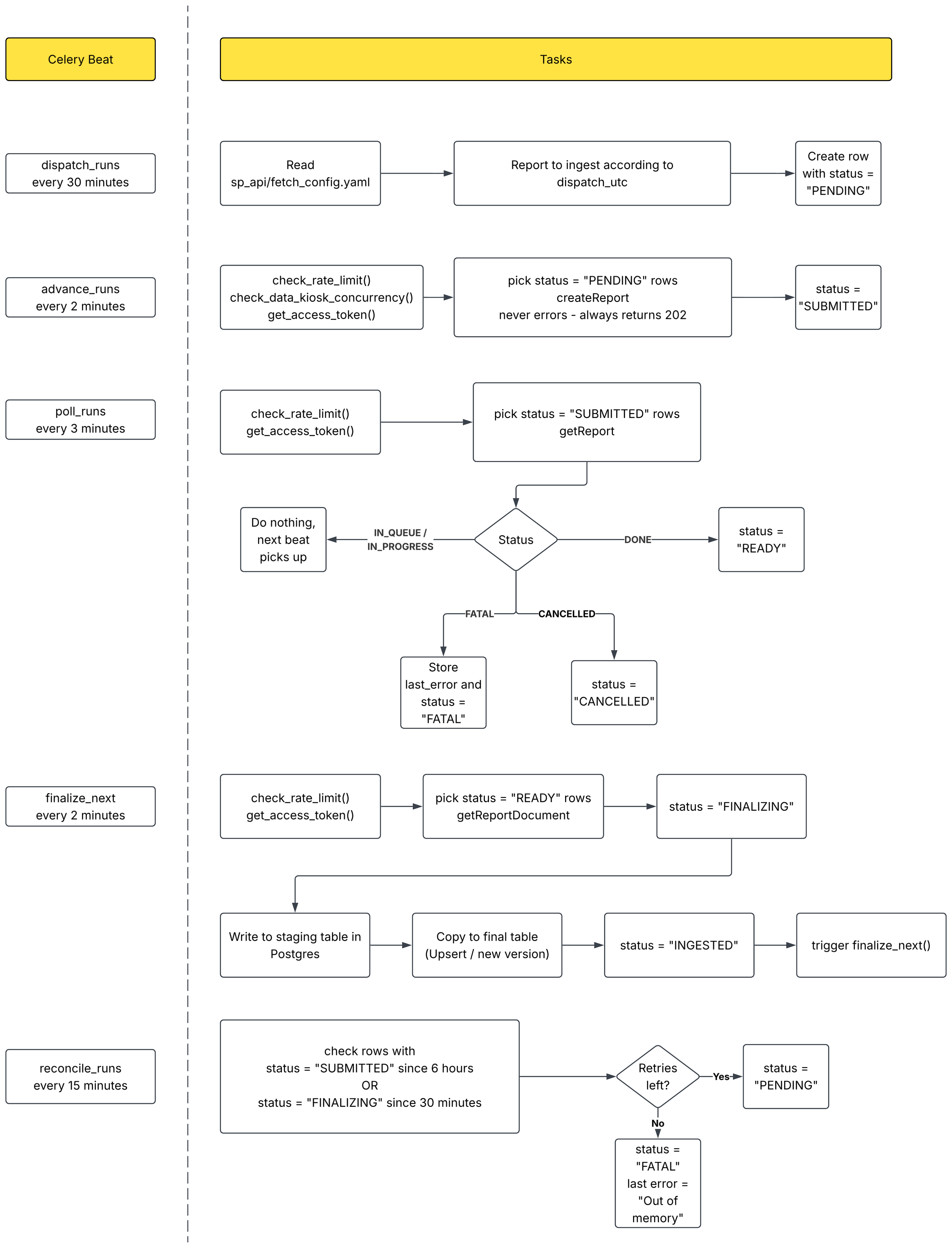
Celery config
Queues:
report_apis— Shared report-fetch lane for the external report-API engines (SP-API + Amazon Ads). A dedicated queue so their create/poll/finalize backoff sleeps neither block nor are blocked by other work. Carries the LIGHT tasks —dispatch,advance,poll,reconcile, pluscheck_seller_authandsend_digests. The heavy decode step lives onreport_finalize.report_finalize— Dedicated lane for the memory-heavy finalize step (download + gzip decode + upsert) of both engines. Split offreport_apisso a decode backlog can't starve advance/poll, and so the worker's--concurrencyis itself the hard cap on concurrent decodes (no count-cap code) with its container memory-sized for exactly that work.
Workers (prod, docker-compose.prod.yml):
| Worker | Consumes | Concurrency | Memory | Role |
|---|---|---|---|---|
worker-report-apis | -Q report_apis | 2 | 1g | Drains the light lane — dispatch/advance/poll/reconcile/auth/digest across both engines. |
worker-report-finalize | -Q report_finalize | 2 | 6g | Drains the heavy lane; --concurrency=2 = hard cap of 2 concurrent gzip decodes; 6g sized for that. |
worker (main) | -Q default,smartlead,dataforseo,bbb,negative_keywords + --beat | — | — | Owns the Beat scheduler; publishes the SP-API tasks that the two workers above drain. Does not consume the report lanes. |
2. Client side throttling (shared local rate-limiter)
- Set up a token-bucketing rate limiter
- The rate limiter will stay in Redis, so every concurrent process reads from and writes to a shared rate limiter
- 2 rate limit buckets:
- Generic — operation rate limits bucket
- Override bucket — report override rate limit bucket
- If
createReportis being called for an overridden report type, the tokens from only the override bucket deplete - Strategies for consuming tokens:
- Generic bucket: set up rate limits with Amazon-documented rate and bursts, consume a token when available
- Override bucket: do the math as per the override, figure out the correct rate of filling 1 token, then consume the token whenever available. Example:
- 3 reports in 5 minutes → rate = calls / seconds = 3/300 = 0.01 → you can make 1 call every 100 seconds.
- So (rate, burst) = (0.01, 1)